#include <cmath>
#include <string>
#include <vector>
#include <iostream>

#include "quickcg.h"
using namespace QuickCG;

//define the width and height of the screen and the buffers
const int screenWidth = 640;
const int screenHeight = 128;

// Y-coordinate first because we use horizontal scanlines
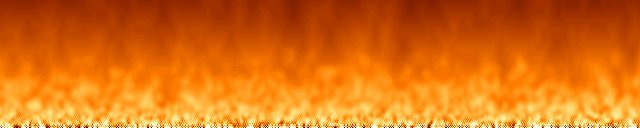
Uint32 fire[screenHeight][screenWidth];  //this buffer will contain the fire
Uint32 buffer[screenHeight][screenWidth];  //this is the buffer to be drawn to the screen
Uint32 palette[256]; //this will contain the color palette

int main(int argc, char *argv[])
{
  //set up the screen
  screen(screenWidth, screenHeight, 0, "fire");

  //declarations
  ColorRGB color; //used during palette generation
  float time = getTime(), oldTime; //the time of this and the previous frame, for timing

  //make sure the fire buffer is zero in the beginning
  for(int y = 0; y < h; y++)
  for(int x = 0; x < w; x++)
  fire[y][x] = 0;

  //generate the palette
  for(int x = 0; x < 256; x++)
  {
    //HSLtoRGB is used to generate colors:
    //Hue goes from 0 to 85: red to yellow
    //Saturation is always the maximum: 255
    //Lightness is 0..255 for x=0..128, and 255 for x=128..255
    color = HSLtoRGB(ColorHSL(x / 3, 255, std::min(255, x * 2)));
    //set the palette to the calculated RGB value
    palette[x] = RGBtoINT(color);
  }

  //start the loop (one frame per loop)
  while(!done())
  {
    //timing: set to maximum 50 milliseconds per frame = 20 frames per second
    oldTime = time;
    waitFrame(oldTime, 0.05);
    time = getTime();

    //randomize the bottom row of the fire buffer
    for(int x = 0; x < w; x++) fire[h - 1][x] = abs(32768 + rand()) % 256;
    //do the fire calculations for every pixel, from top to bottom
    for(int y = 0; y < h - 1; y++)
    for(int x = 0; x < w; x++)
    {
      fire[y][x] =
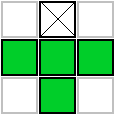
        ((fire[(y + 1) % h][(x - 1 + w) % w]
        + fire[(y + 1) % h][(x) % w]
        + fire[(y + 1) % h][(x + 1) % w]
        + fire[(y + 2) % h][(x) % w])
        * 32) / 129;
    }

    //set the drawing buffer to the fire buffer, using the palette colors
    for(int y = 0; y < h; y++)
    for(int x = 0; x < w; x++)
    {
      buffer[y][x] = palette[fire[y][x]];
    }

    //draw the buffer and redraw the screen
    drawBuffer(buffer[0]);
    redraw();
  }
}
|